


Guaranteed Reviews star ratings can be displayed on the product cards of your Doofinder search results, next to the image and the title of each product.
Regional names. This service operates under different names depending on your market:
- France: Avis Garantis (Société des Avis Garantis)
- International: Guaranteed Reviews
- Spain: Opiniones Contrastadas (Sociedad de Opiniones Contrastadas)
- Italy: Recensioni Garantite (Società Recensioni Garantite)
- Germany: GGB (Gesellschaft für Geprüfte Bewertungen)
- Netherlands: GBN (Gegarandeerde Beoordelingen Nederland)
How the integration works
Your reviews module already loads the Guaranteed Reviews widget script in your store, and that script is what draws the stars. Doofinder does not load it, so the Guaranteed Reviews module has to be installed and up to date.
What you add in Doofinder is an empty container in the product card. When the search results are displayed, the script finds that container, reads the product identifier in it, and draws the star rating of that product together with its number of reviews.
Before you start
Your store has to load the GRC widget script. Not every version of the Guaranteed Reviews module loads it. To check whether yours does:
- Open your store in your browser, right-click on the page and choose Inspect.
- Open the Console tab and reload the page.
- Look for the message
[GRC] Widgets handler loaded. GRC is the Guaranteed Reviews Company, the name the service uses in its code.
If the message does not appear, update the Guaranteed Reviews module to the latest version and turn on the new widgets in the settings of that module, in your store admin. If you cannot find that setting, ask Guaranteed Reviews through their contact page.
You need to edit the Product Card Template. This requires HTML knowledge, and some changes can break the layer. Read Product Card Template first, and save a copy of your current template before changing it.
Add the stars to your product card
- In your Doofinder Admin Panel, go to Search > Layer Settings.
- In the top bar, select the Store that the layer belongs to, and click "Configuration" on that layer.
- Scroll down to Advanced Customization > Product Card Template and click "Customize".
- Paste this line where you want the stars to appear. In the screenshot below it sits after the description block and before the price.
<div class="grc-category-stars" data-product-id={@item["id"]}></div>
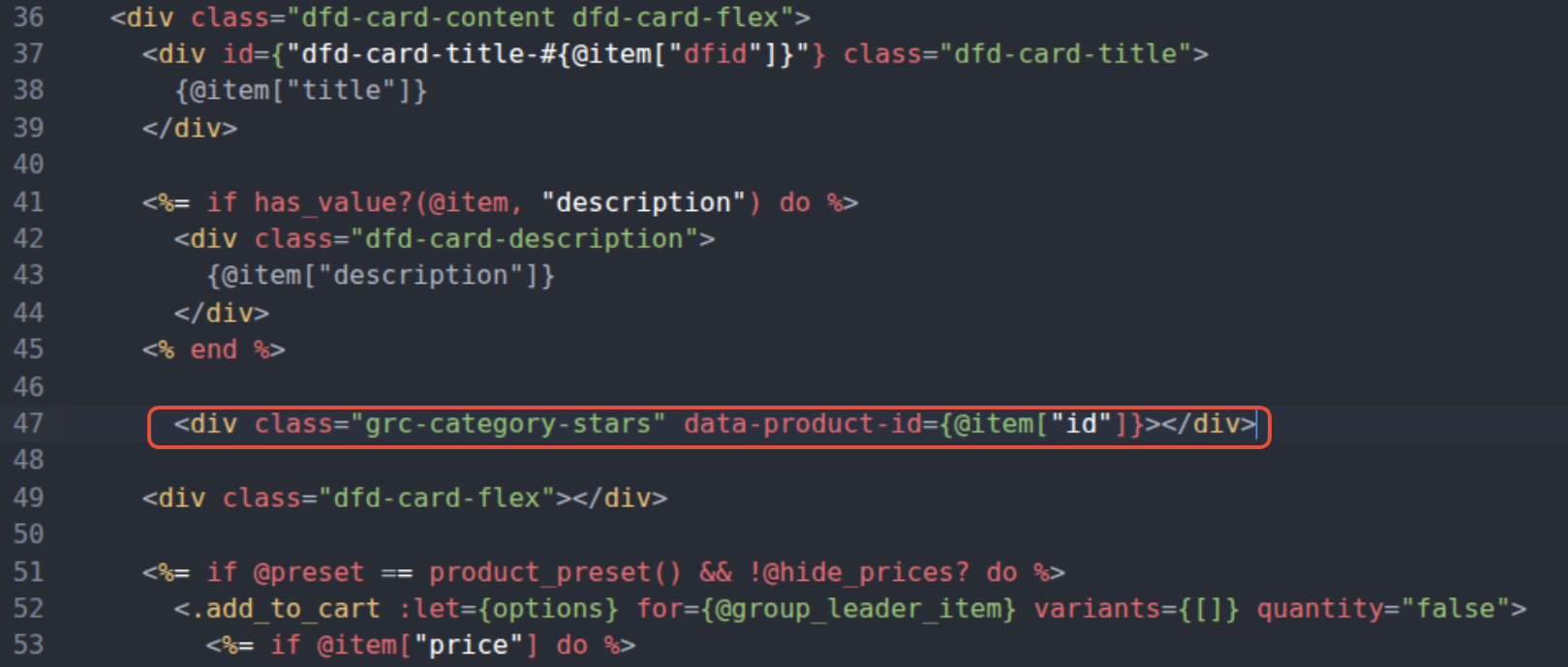
Save the template when you are done.
Each layer has its own template. If you use more than one layer, add the line to each of them.
To align the stars differently inside the card, style .grc-category-stars in Advanced Customization > CSS, as described in CSS Layer Customization.
Run a search on your store and look at the product cards in the results. A product with reviews shows its star rating and the number of reviews next to it, and a product with no reviews shows nothing. You may need to clear the cache of your store and of your browser before the change is visible.
When no stars appear
data-product-id={@item["id"]} sends the value that Doofinder has indexed in the id field of each product. The widget looks for that identifier in your reviews account and draws nothing when it does not find it. If no product shows stars, compare both identifiers:
- Go to your Admin Panel > Search > Results Preview and search for a product that you know has reviews.
- Click the "+" button next to the product to unfold its indexed information, and look at the value of the
idfield. - Compare it with the identifier that the same product has in your reviews account.
If the two do not match, and the identifier used by your reviews account is indexed in Doofinder under a different field, use that field in the container. For example, for a sku field:
<div class="grc-category-stars" data-product-id={@item["sku"]}></div>