


What is a Logic?
In the context of Doofinder's Recommendations, a Logic refers to the specific set of rules and configurations that determine which products are shown in the carousels.
Each Logic responds to different scenarios or business objectives, such as displaying products based on popularity, similarity, user behavior, or personalized by the business goals, among others.
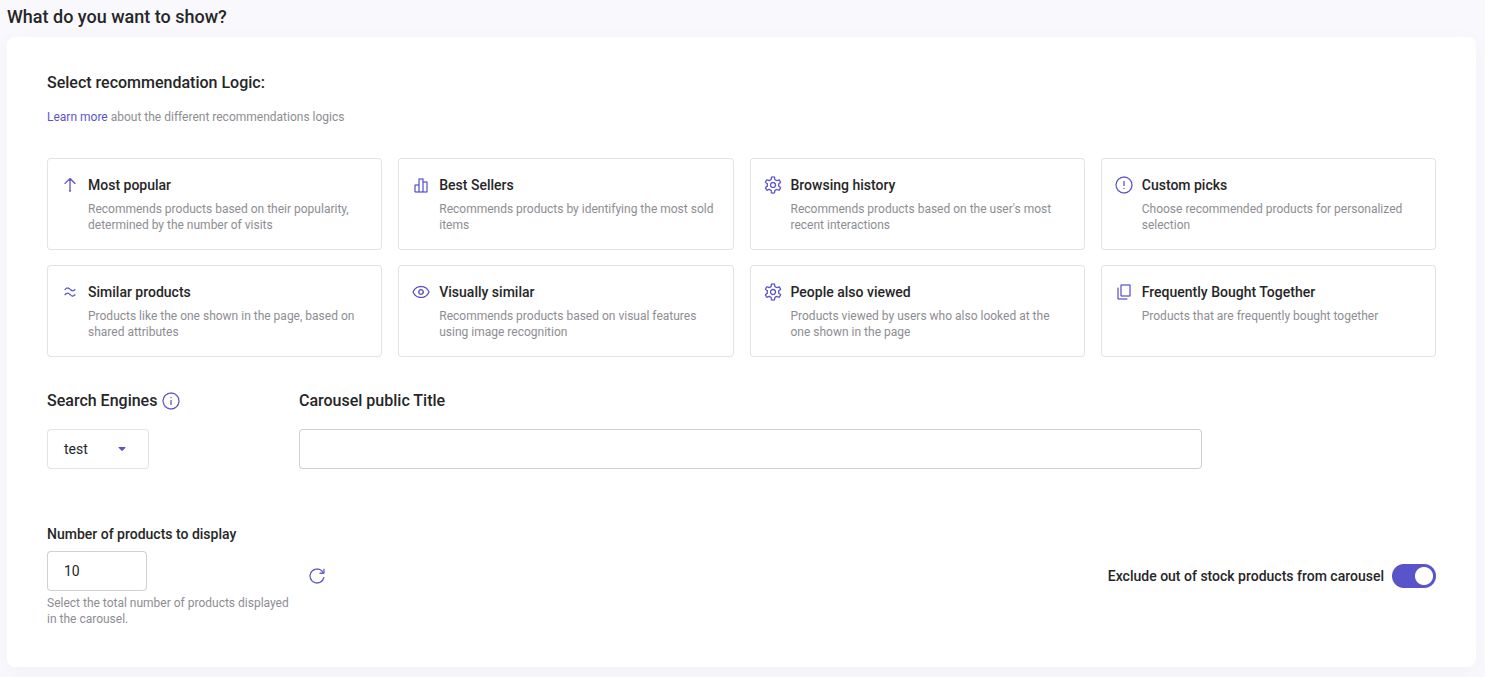
The carousel’s Logic can be modified directly under its configuration. There is no need to create a new carousel in order to use a different Logic. Click Save after making those changes.
Quick Reference Chart Carousel Logics
| Carousel Logics | Type | Recommends | Update | Available Plans |
|---|---|---|---|---|
| Popular products | All Pages | Most visited products (visited URLs) on the whole website in the latest 15 days | Cached once per day | All plans |
| Best sellers | All Pages | Most frequently sold products using Sales Data in the latest 15 days. | Cached once per day | All plans |
| Browsing history | All Pages | User’s most recent interactions | Per session | All plans |
| Custom picks | All Pages | Personalized selection: include or exclude products to show in the carousel | Depends on your rules | All plans |
| Similar products | Product and cart pages | Based on shared attributes (title, description, brand, category) | Depends on the configuration of attributes of the feed | All plans |
| Visually similar | Product and cart pages | Matches the product’s visual features through image recognition | Real time | Advanced |
| People also viewed | Product and cart pages | Products viewed by users who also looked at the one shown on the page | Every 7 days by training | Pro & Advanced |
| Frequently bought together | Product and cart pages | Recommends products by analyzing items that are often purchased together in the same order. Uses Sales Data from the last 90 days. | Cached once per day | Pro & Advanced |
These Logics follow different rules. Some need time to train before they show the right products. Some work on all page types, and others need a reference product, so they only work on product pages and on the shopping cart.
Logics for all Pages
Popular products
Recommends products based on the most visited products (visited URLs) on the whole website in the latest 15 days. This logic updates every day with the data of the latest 15 days.
Best sellers
Recommends products based on the most frequently sold products using Sales Data, in the last 15 days. Products will display linearly, according to the sales ranking.
Browsing history
Recommends products based on the user’s most recent interactions. To display needs 1 product to be seen by the user.
This logic shows products according to the user session. Learn more on sessions.
Custom picks
Choose or define recommended products for personalized selection. Include or exclude products to show in the carousel through rules or by adding individual items.
Logics that Need a Reference Product
Similar products, Visually similar, People also viewed and Frequently bought together recommend against a reference product, so they need a page that gives them one. That is a product page, where the reference is the product shown, or the shopping cart, where the carousel works from what the shopper has in it. Selecting one of these four shows the note "This logic is only applicable to product or shopping cart pages" on its card.
Pair them with Product pages or Shopping cart so the carousel always has that reference to work from.
Similar products
Recommends products similar to the one shown on the page based on shared attributes (title, description, brand, category).
Visually similar
Recommends products that match the product’s visual features through image recognition. The products shown are updated on real time with a similar product to the one viewed.
Note that for this logic Doofinder only considers the exact image. As a result, if a product has multiple variants, the logic will prioritize the variant that visually matches the input the most closely.
Suppose your catalog lists a white t-shirt as the parent product with variants in red, blue, and green. If a user searches for another kind of red shirt, the Visually similar logic will evaluate the red t-shirt variant rather than the white t-shirt or any other color. This ensures that results are aligned with the specific visual input.
People also viewed
Recommends products viewed by users who also looked at the one shown on the page. This logic needs training to function properly. Read how it trains in People also viewed (logic with training).
Frequently bought together
Recommends products that are often bought in the same order as the one shown on the page, so the carousel shows items that complete or complement the main purchase.
This logic needs a correct configuration of your Sales Data, and a Pro or Advanced Plan.
Logics with Previous Requirements
Best sellers and Frequently bought together
To use Best sellers or Frequently bought together, you will first need to configure your Sales Data, so Doofinder can track and register sales on your website. If Sales Data is not configured, you won’t be able to select these logics. A warning will appear for you to remember that Sales Data must be set up. Click on “Configure it here” to go to Sales Data configuration.
If you have recently configured your Sales Data, allow some time for collection. Results will be more accurate once Doofinder has more solid data.

As Sales Data is configured at Store level, you won’t need to configure each Search Engine separately. Once Sales Data is set, all Search Engines will appear in the dropdown menu:

Read this article and learn how to configure your Sales Data.
People also viewed (logic with training)
This Recommendation Logic requires learning with a training period in order to work and display. The carousel will show products only once the Logic is ready.
People also viewed retrieves the information from the data generated from your user’s behavior. Two states apply to it:
-
Learning: this status will appear once this logic is selected. The learning period collects data every seven days. If unable to collect enough data it will train again on the date displayed.
-
Ready: Once the learning is completed it will show as ready and display correctly on your website. People also viewed will train every seven days to be updated with the last data generated.
To ensure your carousel displays products even while this logic is training, enable Fallback for the Popular products logic to populate the carousel. If Fallback is disabled while the logic is training, the carousel will not appear.
First, Logic. Then, Filters.
Filters are used to select products within the selection of items powered by the logic. Within Popular products, for example, you can filter by a brand so the carousel only shows that brand's most visited products.
Any Logic can be narrowed down with Filters, including the Same as Viewed value, which scopes the carousel to the category or attribute of the page being viewed. Learn more in Filters and Fallback.
Dynamic Shopping Cart Carousels
A carousel placed on the Shopping cart page adapts to what the shopper has in the cart. The four logics that need a reference product, Similar products, Visually similar, People also viewed and Frequently bought together, take that cart as their reference and recommend against it.